Split Pay Plans: late payment alerts and plan tracking

A heads up for ACs when a client falls behind, and one place to see where every split pay plan stands.

Live since November 3, 2026
When a client's split pay payment is 8 days late, their AC now gets a task automatically. Every split pay plan also has its own record that shows whether it is current, delinquent, paid off or stopped. When the client pays, the AC's task closes on its own.

Why we built this

Split pay clients who fell behind were easy to miss. Sticky retries a declined card by itself, but nobody on the coaching side heard about it, and by the time someone noticed, the client could be weeks behind.

Now the AC hears about it on day 8, while there is still time to help the client update their card. And anyone can see the full picture of a plan without digging through orders.

How it works

Every morning at 4 AM Pacific, before the day starts, every split pay plan is checked in Sticky and the screens below are updated.

✕ Day 0 Payment due. Card declines. ✕ Day 3 Sticky retries. Declines. ✕ Day 6 Retries again. Declines. AC gets a task 8 Still unpaid. Logged on the client and the plan shows Delinquent. Days 12 and 18 Sticky keeps retrying the card. ✓ Client pays Task closes itself. Plan is Current again. The client can pay at any point: a Sticky retry that goes through, or a re-bill from the billing team.
Why day 8: by then Sticky has retried the card on day 3 and day 6. A client still unpaid after those retries rarely catches up alone, so that is when a call from the AC helps most.

What the AC sees in ACHQ

1. The task in their To do list

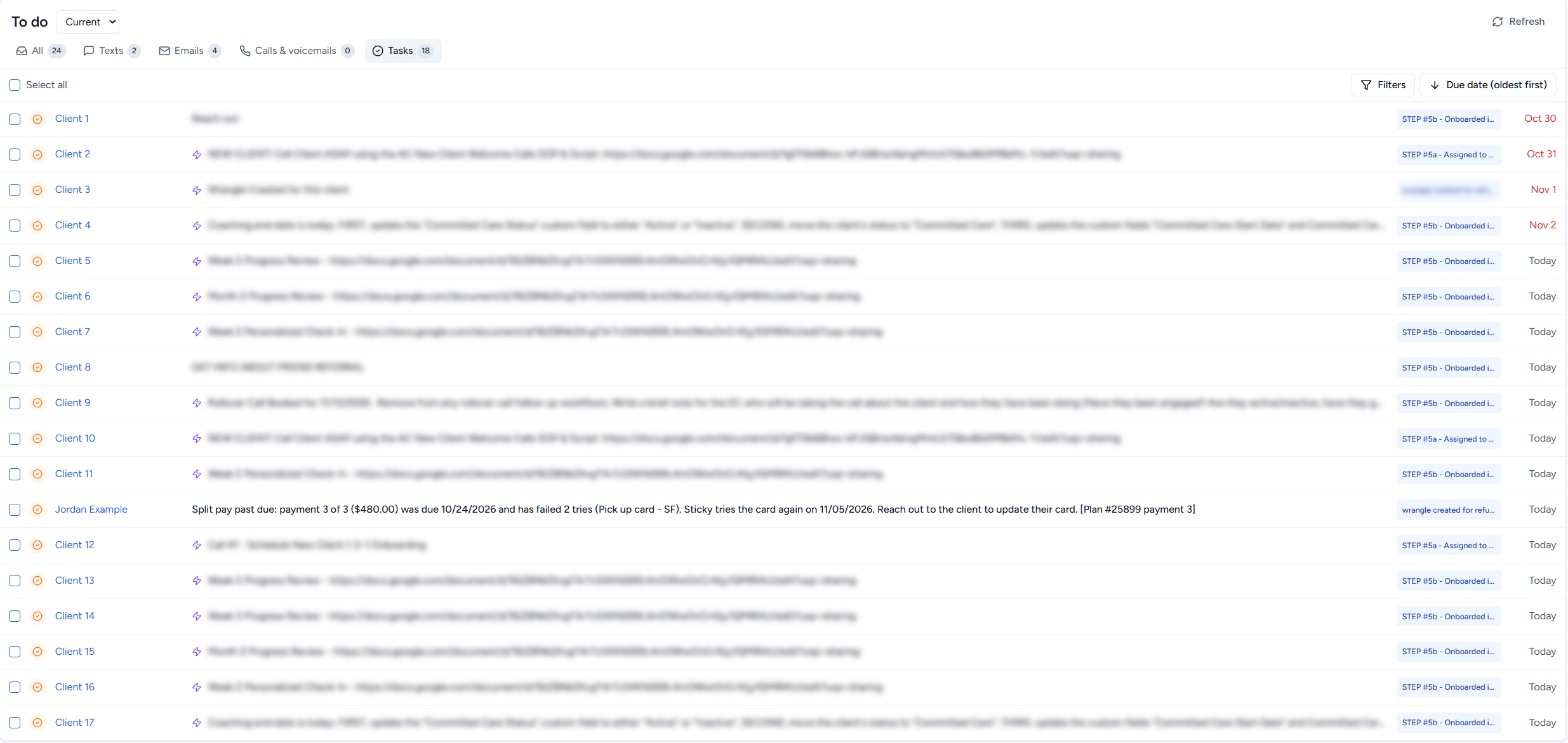
On the morning a payment reaches day 8, the task shows up in the AC's To do list on the ACHQ Dashboard, in the Tasks tab, due that day. It says which payment is late, how much, how many times the card failed and why, and when Sticky tries again. Clicking the client's name opens their page.

Live
ACHQ Dashboard, To do list, Tasks tab. One row reads: Jordan Example, Split pay past due: payment 3 of 3 ($480.00) was due 10/24/2026 and has failed 2 tries (Pick up card - SF). Sticky tries the card again on 11/05/2026. Reach out to the client to update their card. Due Today.
Split pay task
A real AC's To do list. Other clients are renamed and blurred.
Close up
The split pay task row: Jordan Example, Split pay past due: payment 3 of 3 ($480.00) was due 10/24/2026 and has failed 2 tries (Pick up card - SF). Sticky tries the card again on 11/05/2026. Reach out to the client to update their card. [Plan #25899 payment 3]. Today.

When the client pays, the task closes by itself with a note saying when and which order, so nobody chases a client who already paid.

2. The plan on the client's Orders tab

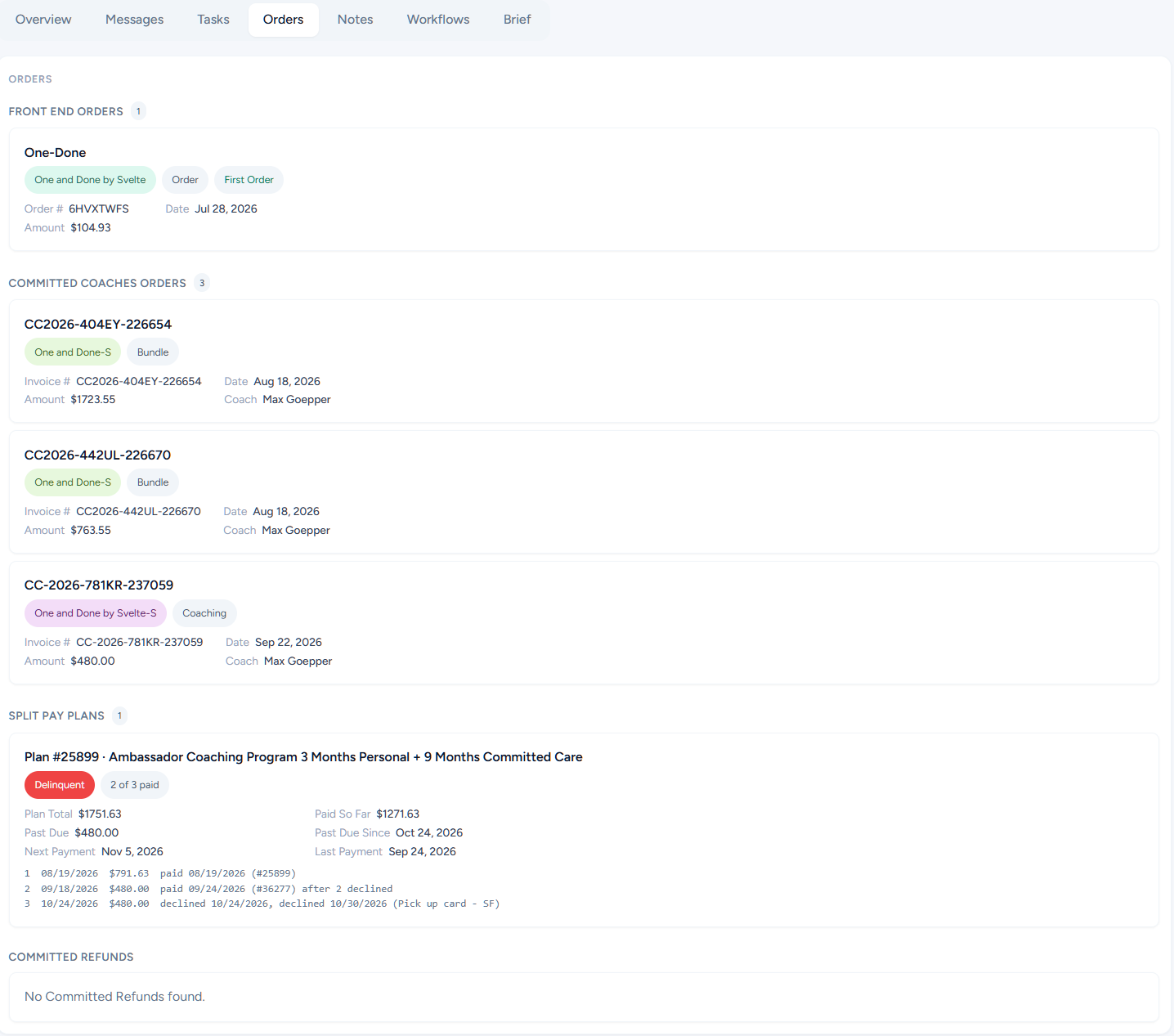
On the client's page, the Orders tab has a Split Pay Plans section. It shows the plan's status, how many payments are in, what is paid and past due, when Sticky bills next, and a line for every payment, including each failed try.
Rolling out with the next ACHQ update
ACHQ client page, Orders tab. Below Front End Orders and Committed Coaches Orders, a Split Pay Plans section shows Plan #25899, Delinquent, 2 of 3 paid, Plan Total $1751.63, Paid So Far $1271.63, Past Due $480.00, Past Due Since Oct 24, 2026, Next Payment Nov 5, 2026, Last Payment Sep 24, 2026, and three payment history lines.
Split Pay Plans
The same client's Orders tab, with the Split Pay Plans section highlighted.
StatusWhat it means
CurrentNo payment is 8 or more days late. A payment that is a few days late still shows Current, with its Past Due Since date.
DelinquentA payment is 8 or more days late. This includes plans where Sticky has stopped retrying on its own, because the money is still owed.
Paid OffEvery payment in the plan is in.
StoppedA team member put the plan on hold, or a payment was refunded. The payment history says who and when.

Where to find it in Close

Everything above is also on the client's lead in Close, in three places.
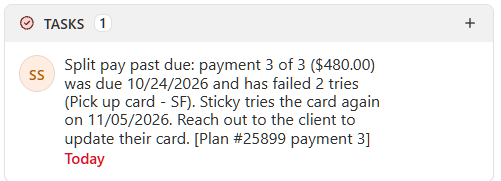
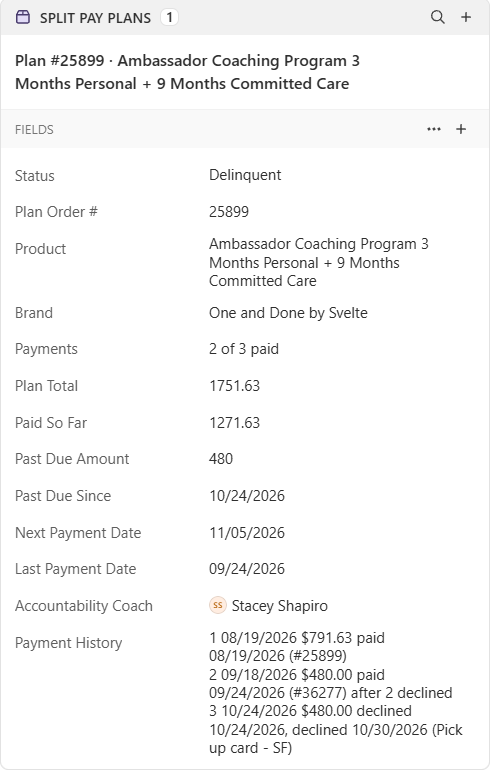
Lead page, left panel: Tasks
Close lead, Tasks panel: Split pay past due: payment 3 of 3 ($480.00) was due 10/24/2026 and has failed 2 tries (Pick up card - SF). Sticky tries the card again on 11/05/2026. Reach out to the client to update their card. [Plan #25899 payment 3]. Today.
The AC's task, assigned to them and due that day.
Lead page, left panel: Split Pay Plans
Close lead, Split Pay Plans section: Plan #25899 with Status Delinquent, Payments 2 of 3 paid, Plan Total 1751.63, Paid So Far 1271.63, Past Due Amount 480, Past Due Since 10/24/2026, Next Payment Date 11/05/2026, Last Payment Date 09/24/2026, Accountability Coach Stacey Shapiro, and the payment history.
The plan record. Click the plan name to open its fields.
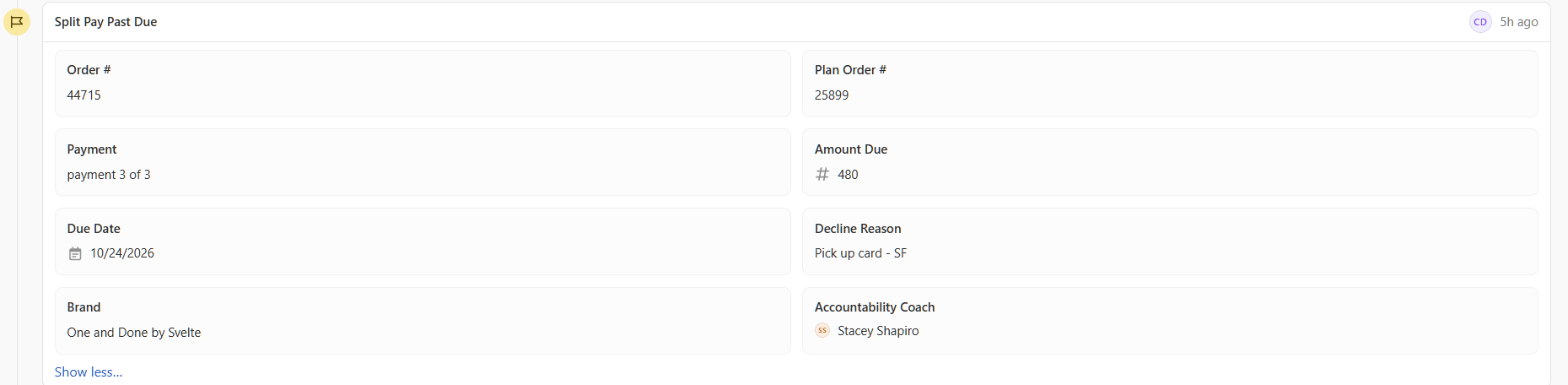
Lead page, timeline
Close lead timeline: Split Pay Past Due entry with Order # 44715, Plan Order # 25899, Payment: payment 3 of 3, Amount Due 480, Due Date 10/24/2026, Decline Reason: Pick up card - SF, Brand: One and Done by Svelte, Accountability Coach: Stacey Shapiro.
A "Split Pay Past Due" entry on the timeline each time a payment reaches day 8, so there is a record of every late payment.

When an AC does not get a task

If a team member has already put the plan on hold or refunded it, the late payment is still logged but the AC gets no task, and any open task for that plan closes with a note saying the plan was stopped. If the client has no AC assigned, the late payment is logged on the client so it is on record.

A small number of declines are caused by a problem on our side with the card processor, not the client's card. Those go straight to the tech team to re-bill, so the AC never has to call a client about our mistake.